
Billing Settings
Package: BASIC
1. General
In the settings section “Billing Settings”, settings for the tax selection and the general ledger accounts of an Organization can be configured. This includes the following settings sections:
- Default values for tax selection) → Default values for tax selection and tax rates on products/services
- General ledger accounts) → Management of general ledger accounts
2. Default values for tax selection
In this settings section, the default values for the tax selection can be defined and the tax rates on products/services can be created/edited/locked.
In the “Default values for tax selection” block, the following settings sections are available:
| Field | Description |
|---|---|
| Default for position block in Billing modules |
|
| Default for products/services |
|
| Default for Incoming Invoices |
|
The tax rates themselves are defined in the Global Settings under Currencies & Taxes.
3. General ledger accounts
In this settings section, the general ledger accounts used in brainX are managed.
In accounting, a general ledger account is any general ledger account that feeds directly into the balance sheet or the profit and loss statement.
For detailed information on general ledger accounts, please contact your accounting department or your tax advisor.
The “General ledger accounts” settings section is generally available, although general ledger accounts are mainly used in connection with the [DATEV Rechnungsdatenservice 1.0]() and [DATEV Buchungsdatenservice]() integrations.
However, in addition to being used with the DATEV integrations, general ledger accounts can also be used, for example, for Reports or PDF exports.
To create a new general ledger account, the "Add general ledger account" button must be clicked. The general ledger account name and the general ledger account number are then entered into the "General ledger account" and "General ledger account number" input fields.
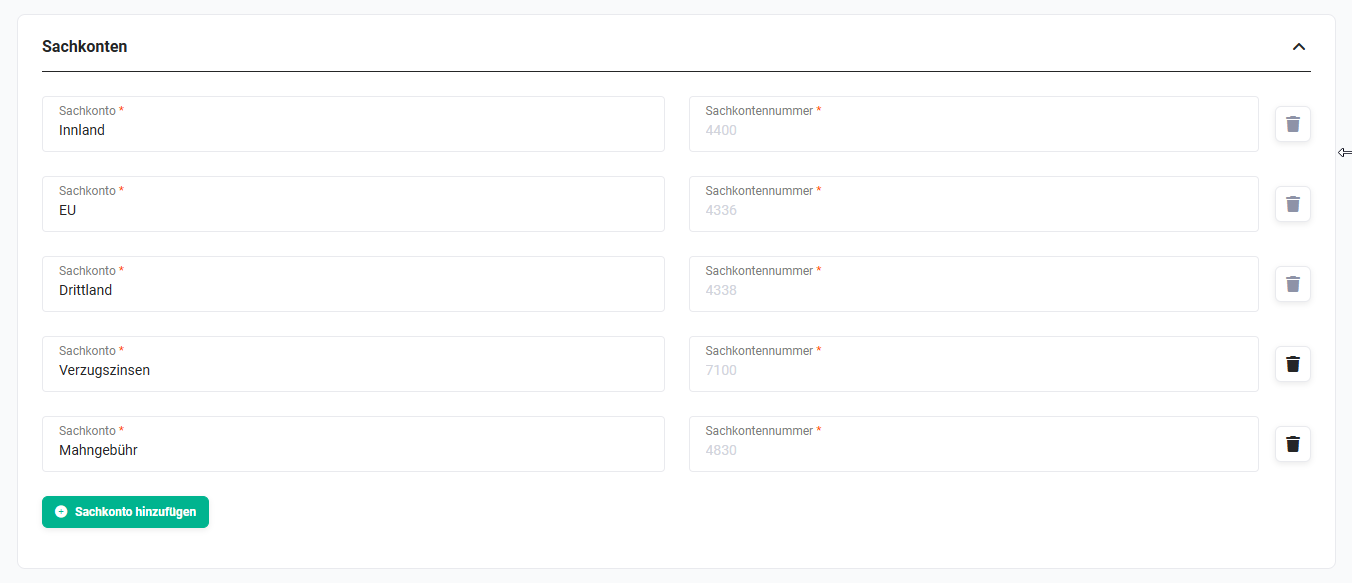 Company information - General ledger accounts
After clicking the "Save" button, the general ledger account is saved. Further general ledger accounts can be created using the "Add general ledger account" button.
Existing general ledger accounts can be deleted using the "Trash" actions icon. The deletion process must be completed by clicking the "Save" button.
General ledger accounts cannot be deleted while they are in use!
Already used general ledger accounts must first be removed from all products, services and product positions before they can be deleted!
A general ledger account name can be changed directly in the "General ledger account" field. After clicking the "Save" button, the changed general ledger account name is saved.
A general ledger account number cannot be changed directly! If a change is desired or necessary here — for example, due to an incorrect entry when creating it — this general ledger account must be deleted and then created anew.
If products and services have already been used in deals, Sales Orders, Invoices, etc., and general ledger accounts were only added afterwards, the records of the mentioned modules must be updated, since the data there was stored in an audit-proof manner.
4. Contracts
The Contracts settings section is available exclusively in the CRM version brainX APP!
In the "Automatic price increase in percent" field, you define by what percentage a price increase takes place when this is configured accordingly in a Contract.
From when and at what interval a price increase takes place is defined in the Contract itself.
Here are the two sections:
5. Practical examples
1 - Setting up general ledger accounts for DATEV export
Initial situation: A company uses the DATEV integration and wants to ensure that all invoice positions are correctly assigned to the corresponding general ledger accounts during export.
Procedure: In the Billing Settings, the required general ledger accounts are created with a name and general ledger account number. The general ledger accounts are then assigned to the respective products and services. During the DATEV export, the positions are then automatically assigned to the correct general ledger account.
Result: The accountant or tax advisor receives a structured export that can be processed directly in DATEV - without manual reworking.
2 - Setting a default tax selection value for net invoices
Initial situation: A company issues net invoices exclusively and wants to avoid users having to manually adjust the tax presentation for each new invoice.
Procedure: In the Default values for tax selection settings section, the Default for position block in Billing modules is set to Group. In addition, the appropriate tax rate is set as the default for products/services.
Result: New Invoices and Sales Orders are automatically created with the correct tax presentation. The manual effort per record is eliminated.
3 - Configuring an automatic price increase for maintenance contracts
Initial situation: A company has several long-term maintenance contracts for which an annual price adjustment is planned. (Only brainX APP)
Procedure: In the Billing Settings, the desired percentage value for the automatic price increase is set in the Contracts section. In the individual Contracts, it is then defined from when and at what interval the increase takes effect.
Result: The price adjustment takes place automatically at the defined time - without manual intervention in each individual Contract.
6. Frequently asked questions
Can I change a general ledger account number afterwards?
No, a general ledger account number cannot be changed directly. If a correction is necessary — for example, due to an incorrect entry when creating it — the general ledger account must be deleted and created anew with the correct number. Note that the general ledger account must first be removed from all products, services and product positions if it is already in use.
Why can't I delete a general ledger account?
General ledger accounts cannot be deleted as long as they are in use. The general ledger account must first be removed from all products, services and product positions before it can be deleted.
I created general ledger accounts afterwards - why don't they appear in already created invoices?
Records in modules such as deals, Sales Orders or Invoices are stored in an audit-proof manner. General ledger accounts added afterwards are not automatically applied there. The affected records must be opened and updated manually so that the general ledger accounts are taken into account.
Which tax presentation is the right one for my company?
This depends on the internal invoicing. The Group setting is suitable for companies that create net invoices with a separate VAT statement. The Individual setting shows gross prices per position. For the correct tax setup, it is recommended to consult a tax advisor.
Where are the tax rates themselves defined?
The tax rates are not created in the Billing Settings, but in the Global Settings under Currencies & Taxes. In the Billing Settings, you only define which of these tax rates is preselected by default.